
Make AI Photo Look Real: Natural Camera I2I
Drop in a glossy, plastic-looking AI render (up to 30 MB) and re-render its lighting, lens falloff, and tactile materials through H3 Image (4K), GPT Image 2 (2K), or GPT Image 2.6—so synthetic scenes read like honest natural-light photographs.
- Single-Reference I2I up to 30 MB
- Anti-Plastic Camera Prompt Builder
- Upfront Credits (12–42 / Render)
Reference image (optional · GPT Image 2 / 2.6 / H3 Image)
JPEG, PNG or WebP · up to 30 MB · 300–6000 px per side · ratio 2:5–5:2.
Optional: upload a reference image for 2K / 4K reference editing, or generate directly from text.
Natural-Light Realism Output
Preview camera-grounded 4K outputs or switch verified optical presets above.
De-AI Camera & Natural Lighting Prompt Builder
Replace plastic triggers like 'hyperrealistic' or 'volumetric rim light' with physical focal lengths, honest daylight, and matte surface cues—openly usable in your browser with zero setup.
1. Scene Domain
2. Camera & Lens Optics
3. Natural Light Direction
4. Tactile Surface Finish
Auto-strips plastic triggers (8K, hyperrealistic, volumetric, unreal engine, neon rim light) from your note.
Anti-Plastic Optical Guardrails
Fine-tune wording directly below before copying or dispatching to the editor.
Reference upload tip: attach a single JPG/PNG/WebP (<= 30 MB) in the editor for H3 Image (4K, 12 cr), GPT Image 2 (2K, 16 cr), or GPT Image 2.6 (26/42 cr). Nano Banana 2 (4K, 18 cr) is text-to-image only.
What Actually Makes an AI Photo Look Real?
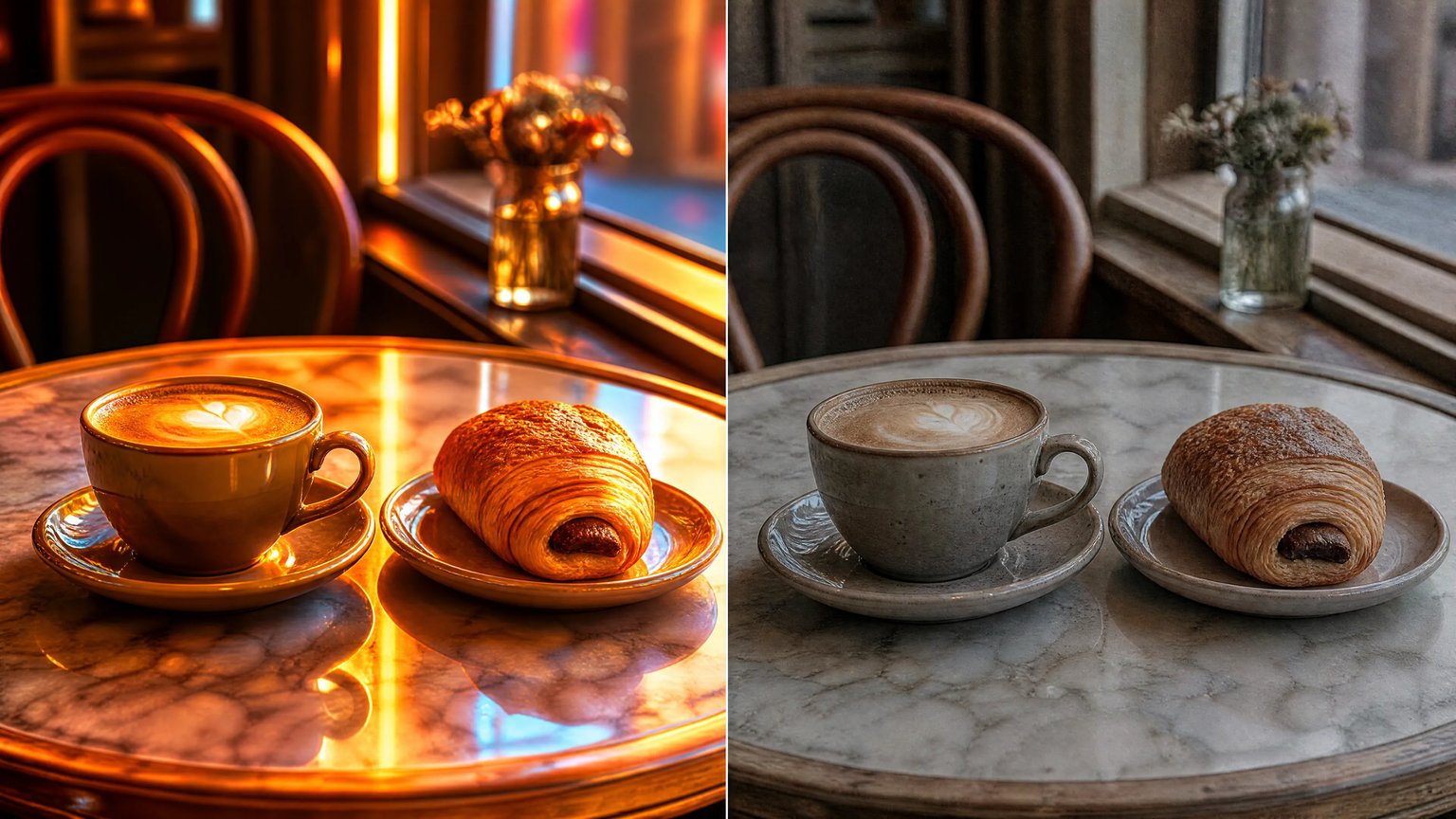
Making an AI photo look real uses full-frame image-to-image optical re-rendering instead of simple sharpening or flat noise filters. By replacing synthetic HDR sheen, orange indoor casts, and plastic smoothing with directional daylight, lens falloff, and tactile surface wear, creators turn glossy AI renders into credible photographs on H3 Image or GPT Image 2.
Part of the browser-based nabn AI visual creation workspace—combining multi-model image-to-image realism with transparent credit pricing and zero local GPU setup.
Replace Glossy CGI Reflections with Grounded Daylight
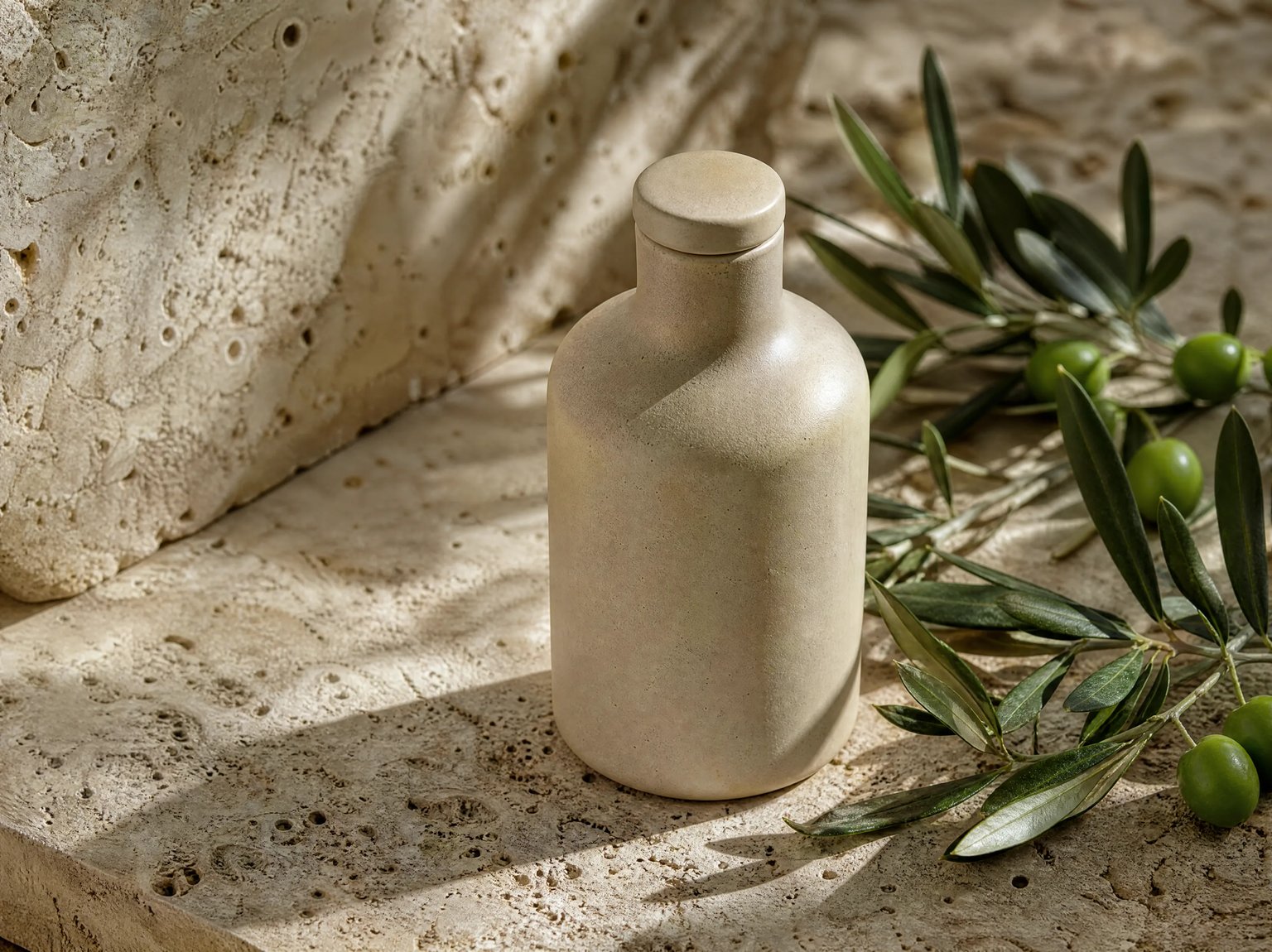
Synthetic e-commerce renders often float above tabletops with mirror-like plastic sheen. Re-rendering through 50mm macro optics and dappled window light anchors bottles and stoneware with honest contact shadows and porous surface micro-texture.
- Soft-edged contact shadows tied to one window light direction
- Porous ceramic glaze and raw stone grain instead of glossy CGI wrap
- Works with single-reference I2I uploads up to 30 MB (JPG, PNG, WebP)
Break Sterile 3D-Render Symmetry in Sunlit Interiors
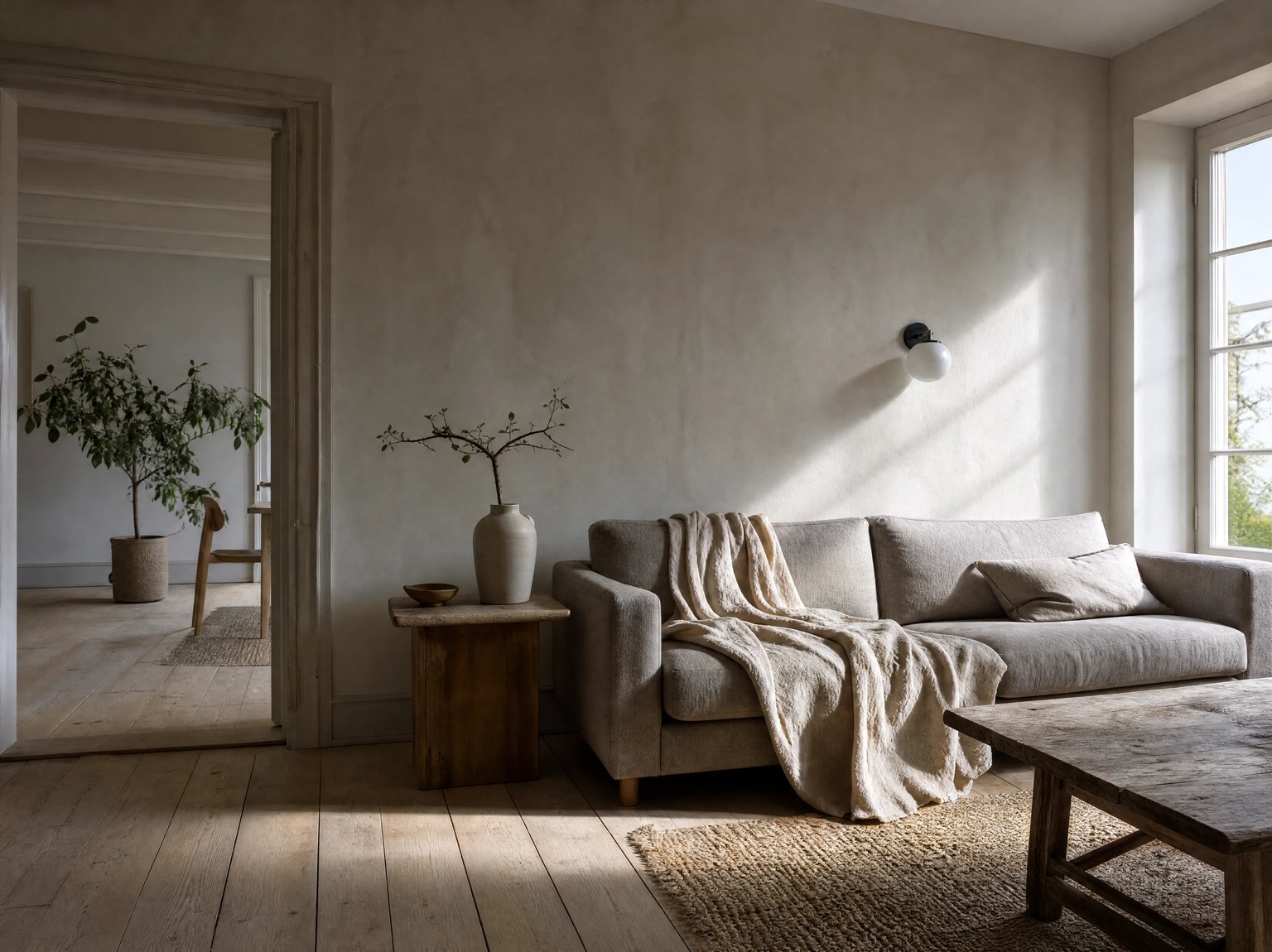
AI room concepts look staged when every wall shines evenly and shadows vanish. Describing 24mm f/5.6 architectural optics, matte limewash plaster, and natural corner exposure falloff turns flat CGI rooms into believable lived-in spaces.
- Honest exposure contrast in unlit room corners instead of flat HDR fill
- Subtle oak plank wear and rumpled linen texture break perfection
- Eliminates warm orange indoor casts without manual color curves

Organic Color Balance Over Flat Photoshop Noise
Dropping a uniform noise filter on an AI image pastes digital grit over highlights without fixing fake light. Full-frame optical re-rendering weaves subtle 400-ISO grain and Kodak Portra-style color restraint directly into matte clay, wood, and linen.
- Natural tonal restraint replaces oversaturated teal-and-orange AI grades
- Fine tactile dust, linen weave, and micro-scratches survive 4K inspection
- Choose H3 Image (4K, 12 cr) or GPT Image 2 (2K, 16 cr) for reference passes
Why Optical I2I Outperforms Upscalers & Noise Filters
Upscaling magnifies fake plastic surfaces, and flat noise ignores lighting physics. Compare how full-frame I2I realism re-rendering fixes all five photographic AI tells.
Fixes All 5 Photographic AI Tells
Targets waxy specular sheen, orange color casts, synthetic HDR rim glow, floating shadows, and rigid symmetry in one cohesive optical pass.
Honest I2I vs T2I Model Routing
Upload a single reference (<= 30 MB) to H3 Image (4K, 12 cr), GPT Image 2 (2K, 16 cr), or GPT Image 2.6 (26/42 cr)—or rebuild from scratch on Nano Banana 2 (4K, 18 cr, T2I only).
Browser-Based, Zero GPU Setup
Run cloud 2K and 4K realism passes right in your browser across 9 paid plans ($20 to $999 USD), with an openly usable prompt builder and optional 2-credit AI Prompt Enhance.
Upfront Boundaries & QA Clarity
Built for full-frame lighting and material realism—not local brush masks, RAW/PSD layers, or cosmetic identity swaps. Small printed labels still warrant vector overlay QA.
I2I Optical Realism vs. 4K Upscaling, T2I Photography & Photoshop Noise
Choose the right tool for your image problem instead of stacking sharpening filters on synthetic lighting.
| Evaluation Factor | Make AI Photo Look Real (I2I) | Standard 4K Pixel Upscaler | Text-to-Image Photography | Photoshop Noise Filter |
|---|---|---|---|---|
| Fixes Plastic Sheen & Fake HDR | Yes — re-renders directional daylight & matte materials | No — sharpens existing synthetic gloss | Generates new scene from text only | No — overlays flat grain over fake light |
| Keeps Existing AI Scene Framing | Yes — single reference <= 30 MB (JPG/PNG/WebP) | Yes — strict pixel preservation | No — creates fresh composition from scratch | Yes — non-generative pixel layer |
| Contact Shadows & Lens Falloff | Rebuilt via 24mm/35mm/50mm optical prompts | Unchanged from source render | Built from scratch via text prompt | Unchanged — requires manual masking |
| Small Packaging Text & Logos | Inspect & overlay clean vector logos post-pass | Preserves crisp existing typography best | Best paired with clean unbranded surfaces | Preserves exact typography |
| Supported nabn Models & Credits | H3 (12 cr), GPT-2 (16 cr), GPT-2.6 (26/42 cr) | External non-generative pixel upscaler | Nano Banana 2 (4K, 18 cr) + all T2I models | External desktop software license |
Need generative clarity reconstruction on soft photos, or a fresh photograph built from text? Explore the dedicated nabn studio workflows in the scenarios below.
How to Make AI Photos Look Real in Three Steps
Stop stacking buzzwords that trigger glossy renders. Follow this repeatable single-reference I2I workflow from upload to final QA.
Upload Your AI Render & Pick an I2I Engine
Attach a single JPG, PNG, or WebP file (up to 30 MB) in the editor and choose H3 Image (4K, 12 credits), GPT Image 2 (2K, 16 credits), or GPT Image 2.6 (26 or 42 credits). Leave the upload blank if you prefer rebuilding from text with Nano Banana 2 (4K, 18 credits, text-to-image only).
Strip Synthetic Buzzwords & Set Physical Optics
Use the De-AI Prompt Builder above to remove terms like '8K', 'hyperrealistic', and 'volumetric rim light'. Specify focal length (35mm f/2.8 or 50mm f/4), one honest daylight source, and matte surface wear—or run optional 2-credit AI Prompt Enhance to polish wording before rendering.
Inspect Micro-Text, Contact Shadows & Color Balance
Check the rendered 2K or 4K photograph at 100% zoom for neutral white balance and grounded shadows. If your image includes brand labels, barcodes, or dense packaging copy, composite clean vector typography afterward rather than relying on pixel re-synthesis.
Where Realistic AI Photo Conversion Works Best
Focused on commercial products, interiors, and documentary scenes—with transparent pricing across 9 paid plans ($20–$999 USD) and clear ethical boundaries.
E-Commerce Matte Product Staging
Replace floating CGI studio shine on ceramics, packaging prototypes, and tabletop goods with dappled morning window light and porous stone shadows. Keep product shapes faithful and overlay vector brand labels afterward.
Architectural & Interior Concept Studies
Turn overly polished 3D-style room renders into warm 24mm f/5.6 interior concepts with limewash plaster texture and honest corner shadow falloff. Label concept renders clearly—never alter real-estate listing condition.
Editorial Lifestyle & Food Moodboards
De-gloss synthetic cafe scenes, artisan workshops, and culinary moodboards using overcast north window light, matte stoneware, and restrained 400-ISO color tones instead of oversaturated AI orange casts.
Concept-to-Location Pre-Visualization
Convert stylized art-direction frames into camera-grounded location references for pitch decks and set lighting tests, without needing local GPU installs or multi-hour manual retouching.
Ready to Strip the Gloss from Your AI Photos?
Upload a synthetic AI render up to 30 MB, dial in physical 35mm or 50mm optics with our prompt builder, and render natural-light 2K or 4K photographs in seconds.
Paid credit workspace with no unpaid tier: H3 Image 12 cr (4K), GPT Image 2 16 cr (2K), Nano Banana 2 18 cr (4K T2I), GPT Image 2.6 26/42 cr, AI Prompt Enhance 2 cr.
View all 9 paid credit plans ($20–$999 USD)Frequently Asked Questions About Making AI Photos Look Real
Honest answers on optical prompts, reference upload support, upscaler differences, label QA, and exact credit pricing.